12. Add to Cart
Bulk Add to Cart
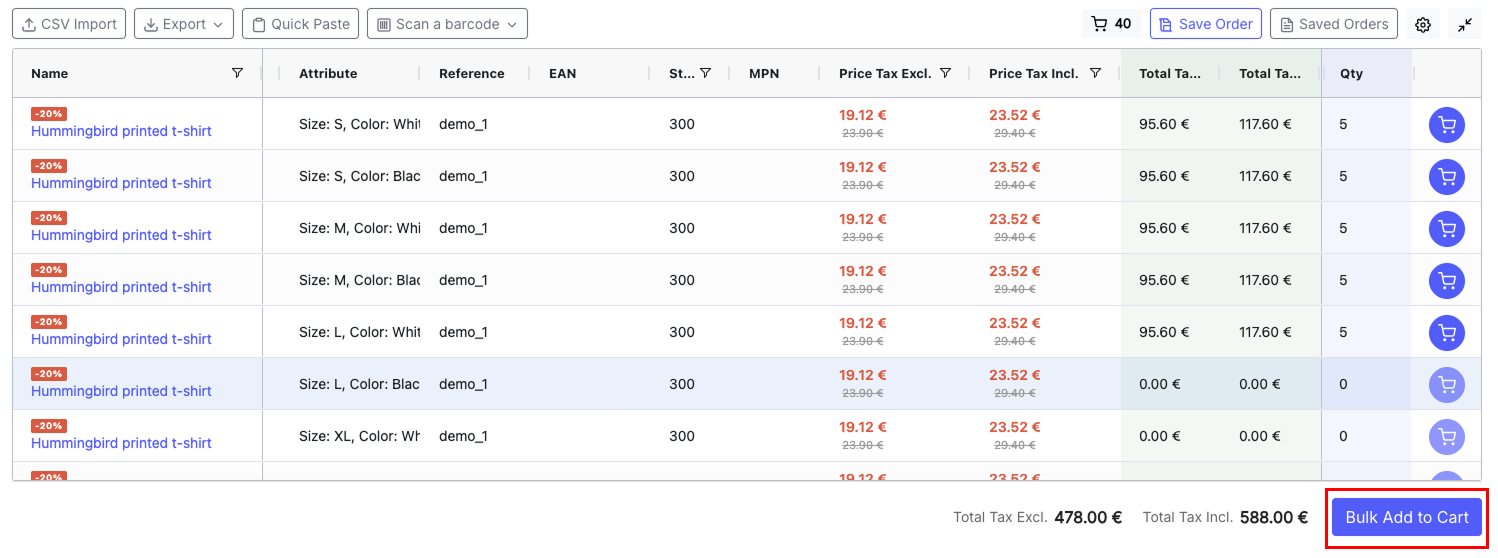
After entering quantities for all desired products, click the Add all to cart button at the bottom of the grid. All products with qty > 0 are added to the cart in a single AJAX request.
The cart badge in the toolbar updates to reflect the new total.
Per-Row Add to Cart
If enabled in the configuration, each product row has an individual cart button. Enter a quantity and click the cart icon to add just that product. The button is disabled when the quantity is 0.
Stock Validation
Before adding to cart, the module validates:
- Out-of-stock products: Respects PrestaShop's "Allow ordering out-of-stock products" setting (global and per-product)
- Available quantity: If ordering out-of-stock is denied, quantities exceeding available stock are rejected
- Minimum quantity: Products with a minimum order quantity enforce that limit
If validation fails, a toast notification explains which products could not be added and why.