7. CSV Import
The CSV import feature lets customers upload a CSV file with product identifiers and quantities to quickly populate the grid.
Step 1 - Click "Import CSV"
Click the Import CSV button in the toolbar. A file selection dialog opens.
Step 2 - Select your CSV file
Choose a CSV file from your computer. Requirements:
- Maximum file size: 2 MB
- Maximum rows: 5,000
- Format: Plain text CSV with any separator (auto-detected)
Step 3 - Column Mapping
The import modal opens automatically. The module auto-detects the separator (semicolon, comma, or tab) and attempts to auto-map columns based on header names.
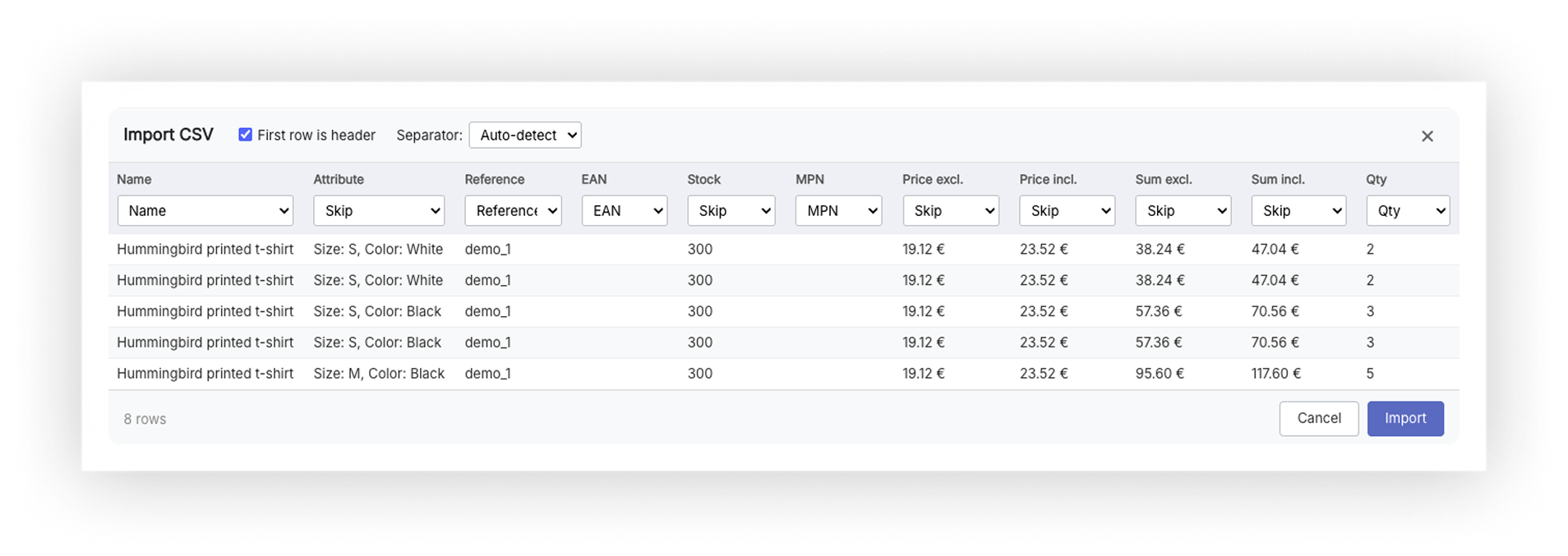
Auto-mapping recognizes column headers in 15 languages - including headers with diacritics (e.g. Množstvo, quantite):
- English, Slovak, Czech, German, French, Spanish, Italian, Dutch, Polish, Portuguese, Romanian, Russian, Turkish, Greek, Hungarian
Step 4 - Map columns
For each CSV column, select what it represents:
| Mapping option | Description |
|---|---|
| - skip - | Ignore this column |
| Reference | Product SKU/reference |
| EAN-13 | European Article Number |
| MPN | Manufacturer Part Number |
| UPC | Universal Product Code |
| ISBN | International Standard Book Number |
| Supplier reference | Supplier's own reference code |
| Product name | Product name (partial match) |
| Quantity | Order quantity |
You must map at least one identifier column and the Quantity column to enable the Import button.
Step 5 - Confirm import
Click Import. The module sends the mapped data to the server for matching. Products are matched at both the product and combination level - for example, if a combination has its own reference, it will be matched to the correct variant.
Result
After matching, a toast notification shows the summary:
- X products matched - quantities applied to the grid
- X products not found - identifiers that could not be matched
- X duplicates - same identifier appeared multiple times in the CSV
Matched products are highlighted in the grid with their quantities filled in.
[SCREENSHOT: Grid after import showing: (1) Toast notification: "12 products matched, 2 not found, 1 duplicate" (2) Several rows in the grid with quantities filled in from the CSV (3) Footer totals updated with the imported quantities]