9. Multi-SKU Quick Paste
Quick Paste lets you type or paste a list of product identifiers (SKUs) directly - no CSV file needed. Ideal for quickly finding products from a spreadsheet, email, or ERP export.
Step 1 - Open Quick Paste
Click the Quick Paste button in the toolbar.
Step 2 - Enter SKUs
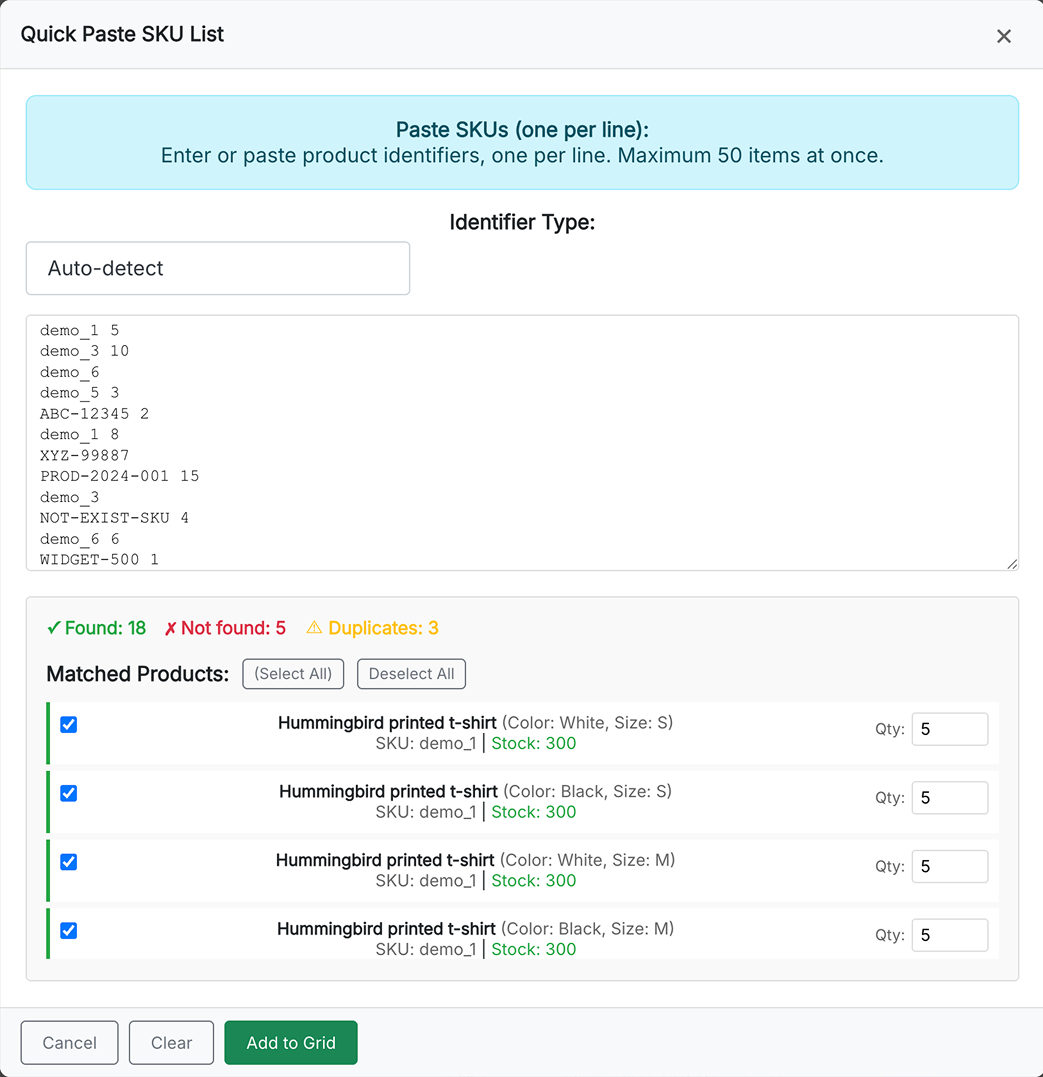
In the modal, type or paste product identifiers into the text area. Supported formats:
REF-001
REF-002 5
REF-003	10
- One SKU per line
- Optional quantity after whitespace (space or tab). If omitted, quantity defaults to 1.
- Maximum: 50 SKUs per request
Step 3 - Select identifier type
Choose the identifier type from the dropdown above the text area. Options: Reference, EAN-13, MPN, UPC, ISBN, Supplier reference, Product name.
Step 4 - Click "Find products"
The module matches your identifiers against the catalog on the server.
Step 5 - Review results
The modal shows matched products with:
- Checkbox - select which products to add (all selected by default)
- Product name and variant - if an SKU matches multiple variants, each is listed
- Quantity - editable, pre-filled from your paste
Products that were not found are listed separately.
Step 6 - Add to grid
Click Add to grid. Selected products are added to the grid with their quantities. If a product already has a quantity in the grid, the new quantity is added to the existing one.