17. B2B: catalog pricing & net/gross VAT
The app is B2B-aware. For logged-in customers who belong to a company (Shopify B2B), it shows the correct catalog price for their company location, including volume price breaks and quantity rules (min / max / increment). Add-to-cart uses these prices, and Shopify applies them at checkout.
Net + gross VAT display
When you enable VAT price display (B2B) (Section 4.4) and
grant the one-time write_draft_orders permission, B2B buyers see three price columns
instead of one — Price excl. VAT, Price incl. VAT, and VAT (with the rate,
e.g. 23%) — and the footer shows three figures: Total excl. VAT, Total incl. VAT
and the VAT amount.
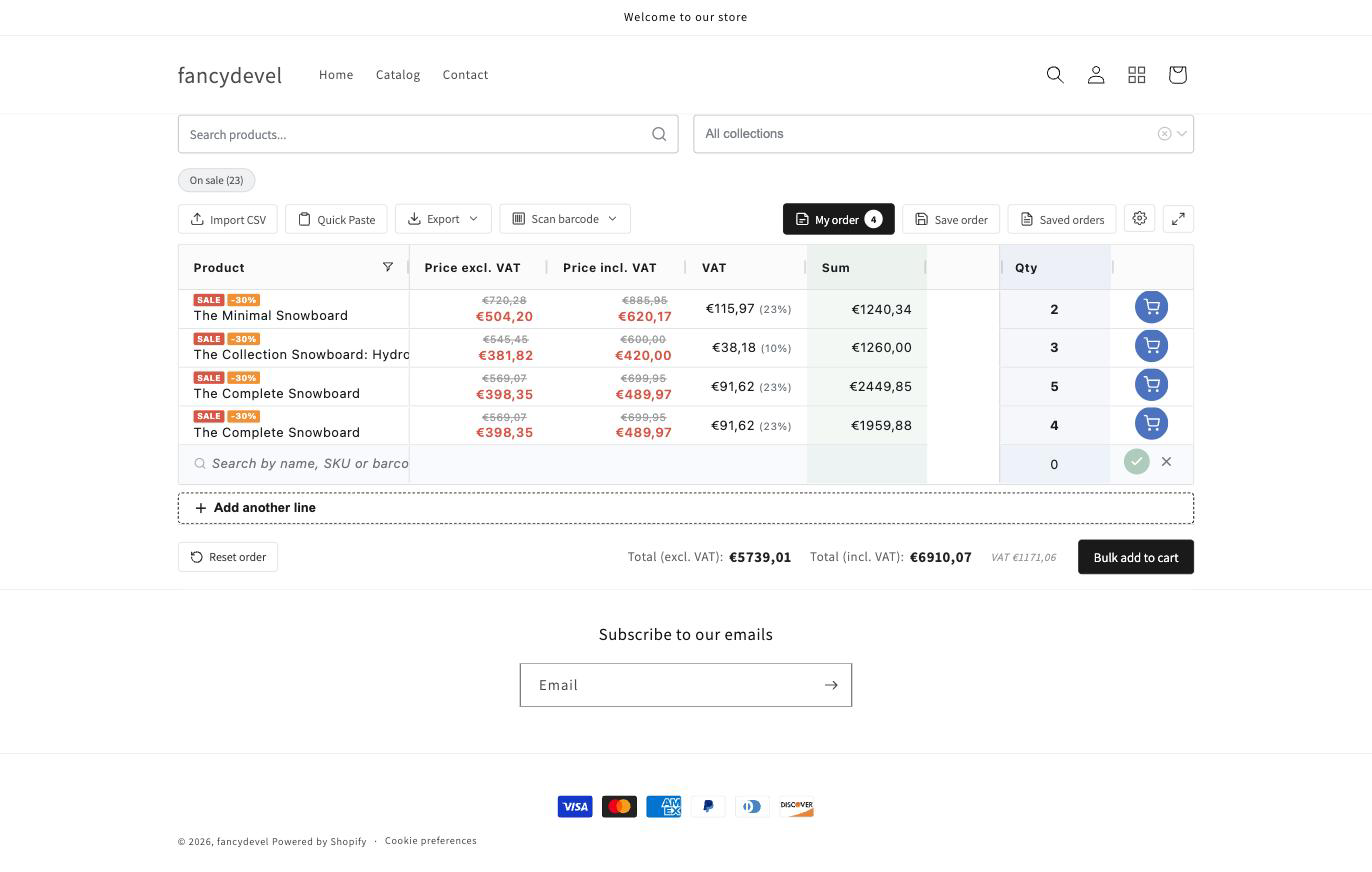
- The tax rate is read from Shopify automatically (no rate tables to maintain), and mixed-rate orders (e.g. 23% for most items, 10% for others) are handled correctly — each line shows its own rate.
- This view is shown only to logged-in B2B company buyers. Guests and regular retail customers keep the single price column.
- The checkout price is always authoritative — the grid figures are an accurate preview.